Immigration e-gates
NAIA's immigration e-gates clear eligible passengers at a self-service gate instead of a manned counter, without scanning a boarding pass.
An e-gate reads your passport, checks your face against it, and opens if everything lines up. No officer stamps your passport, and there's no booth queue. When you qualify, it takes seconds. Whether you qualify depends on three things: your passport, your direction of travel, and whether you've been pre-screened.
Jump to
- Before you begin: the requirements that apply before you can use any e-gate.
- Arrivals: arriving Philippine passport holders can use the e-gates. Fast and straightforward.
- Departures: conditional for Philippine passport holders, and open to foreign passport holders too.
- Pre-screening and APIS: how the system decides who gets a green light.
- If the gate turns red: what it means and what to do.
- First-time travellers: why you should expect the manned counter.
- How to use the gate: the step-by-step at the machine.
Before you begin
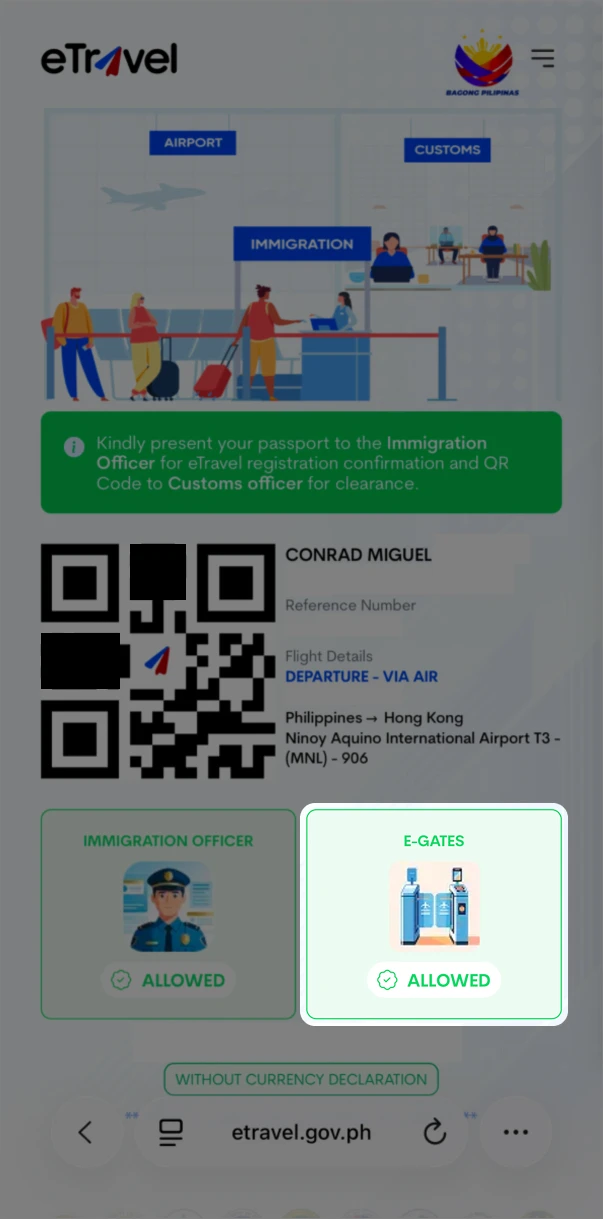
Whatever your direction of travel, you need one thing in place first: a completed eTravel declaration. This applies to both arrivals and departures. The e-gate relies on that record, so if you haven't filled it out, you can't use the gates. Do it before you get to the airport.
Beyond that, eligibility depends on your direction of travel and your passport:
- Arrivals are for Philippine passport holders. If you are a foreign national arriving in the Philippines, use the manned counters.
- Departures are open to both Philippine and foreign passport holders. Foreign nationals leaving the country can clear immigration at the gate.
You don't need a boarding pass to scan. The gates work from your passport and your face; older machines needed a barcode step, these don't.
Arrivals: coming into the Philippines
If you hold a Philippine passport and arrive on an international flight, you can use the e-gates. Any arriving Filipino passport holder qualifies, as long as eTravel is done.
It's fast, and you don't need to scan a boarding pass. You scan your passport, look at the camera, and the gate opens. No interview. Take off anything covering your face (hat, mask, sunglasses) so the camera can match you to your passport photo.
Children, senior citizens on wheelchairs, and other travellers with disabilities are better off at the manned counter, where an officer can assist them. The e-gate handles one passenger at a time, and each person has to stand and face the camera alone.
Departures
Philippine passport holders
Departures are more selective than arrivals, because immigration screens who's allowed to leave. For Philippine passport holders, e-gate use is conditional: the Bureau of Immigration decides your eligibility based on whether you've been pre-screened for this flight.
There's no extra step to take. You walk up and present your passport like on arrival. If you're pre-cleared, the gate opens. If you're not, it turns red and sends you to a manned immigration counter, where you clear as usual. Either way you get through; the gate only decides which route you take.
You can check whether you are eligible to use the e-gate when you create your eTravel, which will flag if e-gate clearance is available for your trip.
OFWs with a valid OEC linked to their eTravel registration can use the e-gates too. In Terminal 3, a dedicated e-gate area sits inside the OFW Lounge.
Passengers below 18 cannot use the gates yet on departure. Minors need an in-person document check with an immigration officer, who confirms whether you need a DSWD travel clearance. Filipino minors travelling abroad without a parent need that clearance, so the check happens at a manned counter, not the gate. If you are travelling with a child under 18, plan for the manned counter and allow a little extra time.
Foreign passport holders
If you are a foreign national leaving the Philippines, you can use the e-gates to clear immigration on your way out. The gate clears you for a smooth exit as long as you complied with the conditions of your stay. That means no overstay, no pending immigration liabilities or unpaid fees, and no other issues on your record.
There's no extra step. Make sure your eTravel is done, then present your passport and look at the camera as you would at a manned counter. If everything is in order, the gate opens and you are on your way. If something in your record needs attention, the gate turns red and sends you to a manned immigration counter, where an officer can sort it out.
Pre-screening and APIS
The Bureau of Immigration runs pre-screening on its Advance Passenger Information System (APIS). Airlines linked to APIS send passenger and flight details to immigration ahead of the flight, so officers can review travellers before they reach the gate. Because that check happens in advance, the gate can clear an eligible passenger automatically. Immigration finishes the work before you reach it.
Many factors decide whether you end up pre-cleared. Settle your travel tax and link it to your eTravel; travellers with an established travel history are usually pre-cleared. If you're an OFW, make sure your OEC number is linked to your eTravel. No single checkbox decides it; the system weighs your record as a whole.
Because pre-screening depends on the airline sharing data, it only works on carriers that are connected to the system. The Bureau of Immigration has been bringing airlines onto APIS in batches (dozens are already linked), and all international carriers operating at NAIA are required to be transmitting data by June 30, 2026. If your airline hasn't linked to APIS yet, you'll use the manned counter regardless.
If the gate turns red
A red light at the e-gate means you weren't pre-screened for this trip, not that something's wrong with your documents. Your airline may not have linked to APIS yet, or you may not fall into one of the eligible groups for departure.
When this happens, move to a regular manned immigration counter and clear as usual. The manned counter is the standard route, and the officers there handle these cases all day.
First-time travellers
If this is your first international trip on your passport, expect the manned counters instead of the e-gates. First-time travellers aren't pre-screened for the e-gates, so plan for a regular immigration interview and allow a little extra time.
How to use the gate
Once you qualify, the gate itself is quick:
- Make sure your eTravel is done.
- Approach an open e-gate and place your passport on the scanner when prompted.
- Look at the camera with your face uncovered. Remove hats, masks, and sunglasses so it can match you to your passport photo.
- Wait for the gate to open, then walk through. There is no boarding pass step.
- If the gate doesn't open or turns red, go to a manned counter instead.
Tips
Complete your eTravel before heading to the airport, and keep your QR code handy in case someone checks it elsewhere.
Have your passport ready and your face uncovered when you reach the gate.
A red gate is a normal outcome, not a setback. Step over to a manned counter and clear there instead.
Sort your travel tax and plan how you'll get to NAIA before your flight, so you arrive with time to spare.
Spot something out of date or off?
Prices, schedules, and routes at NAIA change without much warning. If you've travelled recently and something here no longer matches what you saw, please write in. Same if you'd like to help with a guide of your own.